Logo
Best practices

How 5 Customers Used our Webpage Builder Pages to Create a Website Without Coding

Florian FeuerFlorian Feuer
Updated on Nov 26, 202610 min read
Picture of a woman taking notes and looking at how to create a website without coding with LoftOS' integrated website builder Pages

Ever felt like creating a website can seem like an impossible feat if you don't know how to code? Between learning complex programming languages, configuring servers, and tweaking endless lines of code - it's enough to make your head spin!

But what if I told you there's another way.

A way to design beautiful, functional websites with the simplicity of dragging and dropping blocks? Well, let us introduce you to the magical world of no-code website builders!

Yes, building your dream website doesn't have to be a journey through a code-infested jungle! This is where ideas take flight without the need for tech wings, where 'design', 'web', and 'free' are not just words, but powerful tools at your fingertips.

Intrigued? I don't blame you! Now, let's shift gears and explore something tangible.

In this article, we're spotlighting 5 of our customers who've creatively used LoftOS's Pages. These aren't just stories about building websites without code; they're real-life examples of how our platform brings diverse visions to life.

But before we get into that, let's explore some of the core benefits of using a no-code website builder.

Can I Create a Website Without Coding?

The short answer is yes!

Quick answer: A no-code website builder lets you assemble pages from ready-made blocks in a visual drag-and-drop editor, so you never touch HTML, CSS or JavaScript. You pick a template, add your text, images and forms, and publish. Many builders, including LoftOS (our product), offer a free plan to start with.

If the idea of tackling web design seems daunting because you lack coding skills, fret not! No-code website builders make it super easy, enabling anyone to create custom web pages.

Unlike traditional web development which requires knowledge of HTML, CSS, JavaScript and more - no-code platforms allow you to visually drag-and-drop elements to build your pages.

No-code website builders make it possible for literally anyone to build a website without any coding skills. Rather than writing complex code, these platforms provide an intuitive visual editor to design and customize your site via drag & drop.

It can't get easier than this!

Keep reading to understand the major benefits of using a visual editor and how LoftOS's Pages empowers users to create fully customized sites.

Why You Should Use A No-Code Website Builder

Thinking of building a website, but coding feels like a maze?

Here are some of the main reasons everyday users and entrepreneurs are switching to no-code tools for website building:

Speed: Forget any coding knowledge! No need to spend months learning HTML, CSS, JavaScript and web architecture. Visually design a professional quality website in just a few hours!

Affordability: Hiring a developer costs thousands. No-code tools allow you to DIY at low monthly rates. Many platforms, like LoftOS, offer a free plan to get started.

Simplicity: Forget about coding complex elements by hand. Website builders help you create easily via intuitive drag and drop while still having the design customization you need. It's similar to using a PowerPoint document.

Own Your Site: Don't rely on a developer to make changes. No-code platforms make it easy to maintain and edit a live site.

Scalability: No-code website builders offer the possibility to connect your web apps like marketplaces or internal tools to your new web pages for diverse functionality. This includes turning your site into a fully functional web portal tool, perfect for creating dashboards, client access points, or member-only areas. This means you’re not just building a site, you can create a digital platform that grows with your business needs.

Clearly, no-code sets the foundation for getting online faster, cheaper and without needing development resources.

Website Builder vs. Coding: Which One is Better?

Think of website builders as a digital friendly guide. They're incredibly user-friendly, even if you've never built a website before. You get: A toolbox filled with all sorts of design goodies – templates, widgets, and more, all without needing to learn any techy stuff.

And the best part? You can go from an idea to a live website in no time!

Coding, on the other hand, is more like crafting something entirely from your imagination. It's great if you want something super specific and are okay with spending more time and effort. However, it's important to remember that this freedom comes with a price – time. Taking an idea to production can take months.

For businesses eager to hit the market swiftly, coding can be a lengthy journey, instead, we can speed things up with a web design tool like Pages, our integrated DIY website builder.

Build with The Power of Pages — Without Writing Any Code

Article image

So, we've seen how coding can be like waiting for paint to dry. Long, right?

Let's explore a way to skip all that and still get a stunning website without the need for coding. We're talking about Pages, our integrated website builder.

No more back-and-forth with IT, no more waiting for someone else to piece your vision together. Now, you can launch a website where you're in control, shaping each page to perfectly align with your style and needs.

Wished you could tweak your site's look without a tech team's help? 'Pages' makes that dream a reality. Want to incorporate forms and databases without touching code? Easy. Fancy a different layout? You got it. No delays, no extra fees – just pure creative freedom to quickly create responsive, professional sites.

Want to know more? Check out the Pages feature overview and learn how to design a website fuss-free.

Now let's take a look and see how these 5 innovators chose the quickest path to launching their online presence, effortlessly and without a single line of code with Pages.

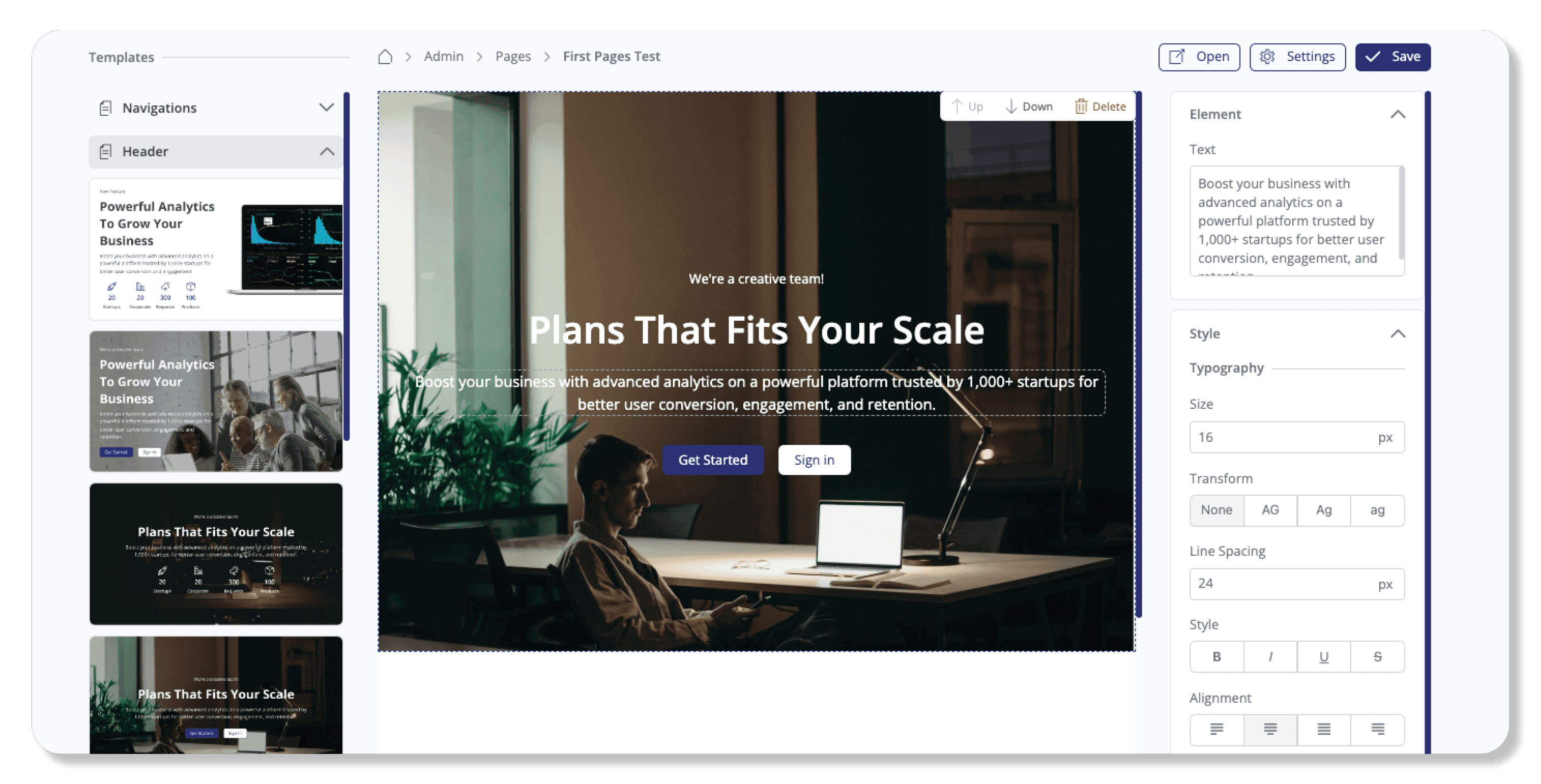
Welcome Page by Health Proc Europe to Grow Their Membership

Article image

Health Proc Europe had a vision to create an online community hub bringing together healthcare procurement professionals across Europe to collaborate and share knowledge. They leveraged the customization potential of Pages to design and build a tailored site from scratch for this industry niche.

The Healthcare Buyers Community platform serves as their central gathering place for members to connect, exchange insights, and work on projects advancing innovation in European healthcare.

To introduce visitors to the offerings of this new community, Health Proc Europe used Pages to design a professional welcome page for their community.

They chose a flexible community website builder that allowed them to customize everything from layout to integrations, critical for building engagement within a professional audience.

Their page highlights:

  • Key focus areas of the community like knowledge sharing and partnership on value-based procurement initiatives
  • An overview of the different offerings in their platform and links to their resource library
  • Details on their upcoming annual conference for European healthcare supply chain leaders

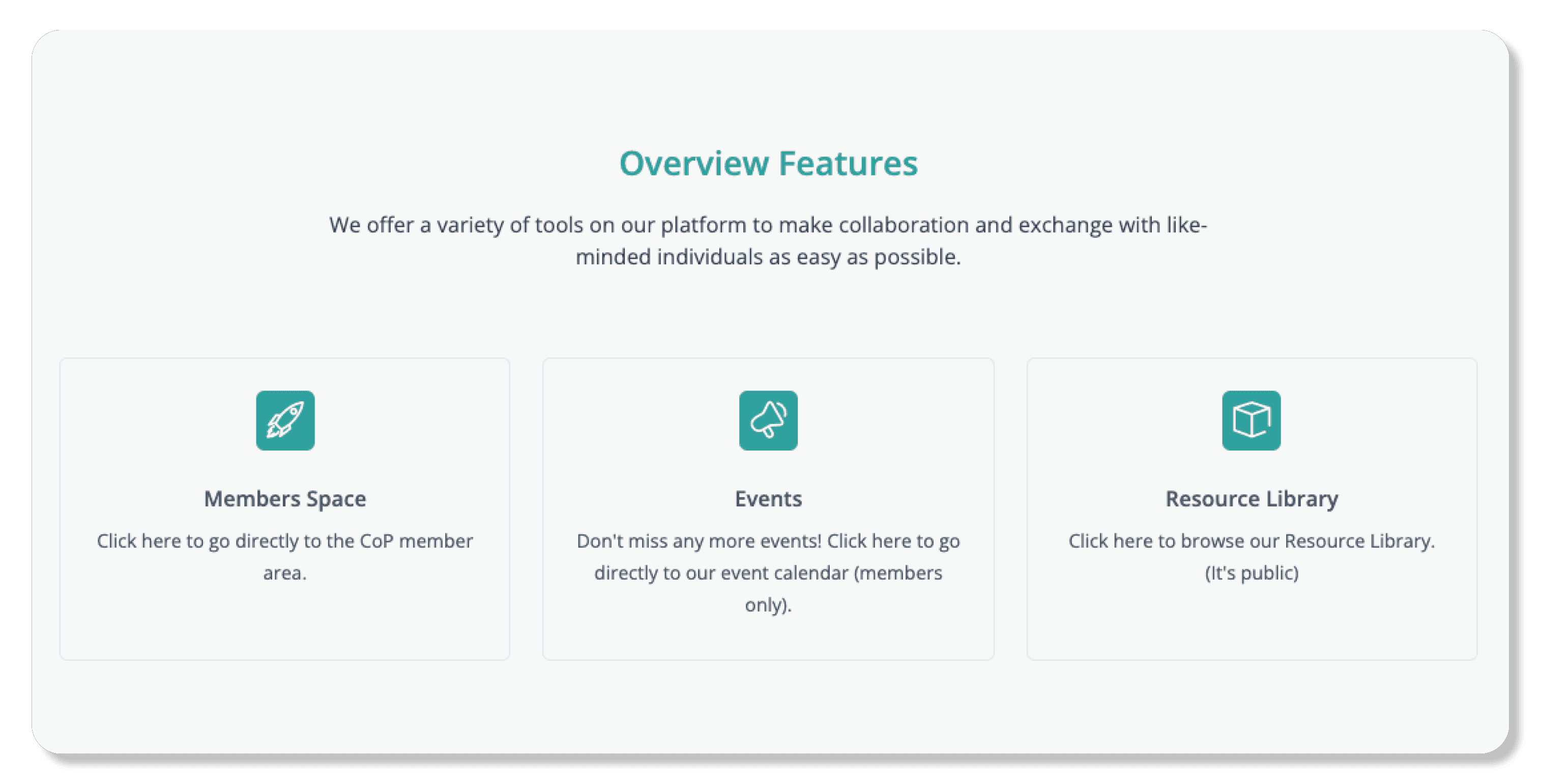
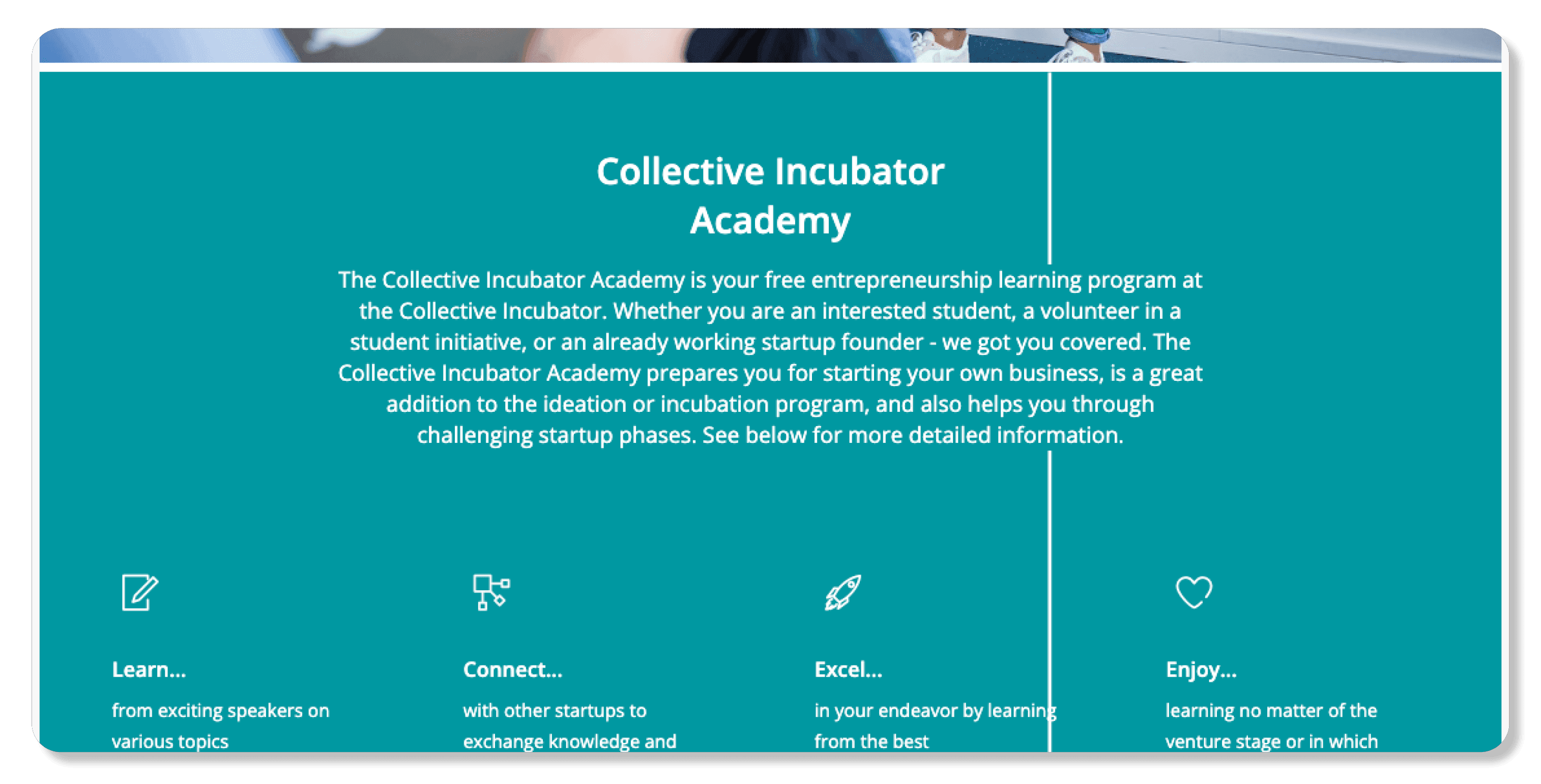
Collæb: Empowering Startups through Custom Landing Pages

Article image

As a rising star in the startup ecosystem, Aachen knows a thing or two about innovation! Looking to energize the startup scene, RWTH Aachen University created Collæb - an online co-creation community connecting idea stage founders with resources to turn concepts into companies.

Central to this initiative is their Incubator Academy, conducting virtual workshops on crucial elements like fundraising, branding, apps without code and more. To promote these events and enroll founders, Collæb designed a sleek welcome page through our drag and drop editor.

This visual lead capture page outlines:

  • Upcoming seminars and schedules
  • Notable mentors leading sessions
  • The hands-on support available for enabling entrepreneurial vision

Beyond the welcome page, Collæb leverages Pages’ no-code flexibility to continually create new custom websites as needed. Whether showcasing their incubator program perks with eye-catching website design or lead gen landing pages for special projects like their ideation program, Pages intuitive builder helps them rapidly create professional custom websites from scratch.

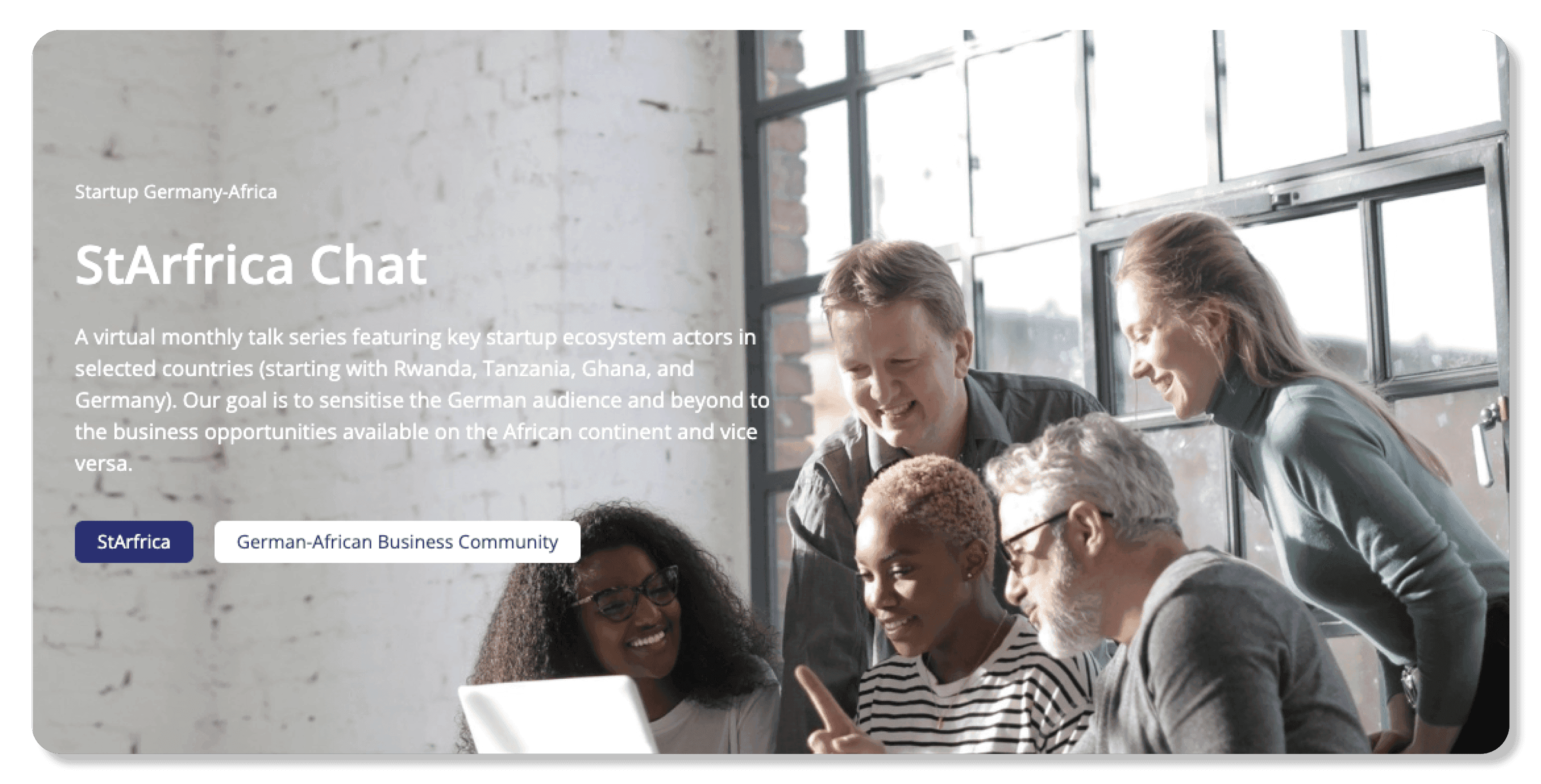
StAfrica: Promoting Startup Dialogues Through Event Pages

Article image

StAfrica has an ambitious goal - create a digital ecosystem fostering startup collaboration between Germany and African nations.

With origins at the University of Koblenz, this initiative enables African entrepreneurs to access networks, education and resources to bring visions to life while opening doors for partnership across continents.

To spotlight their virtual events and conversations with experts from both regions, StAfrica was seeking the right website builder to easily create customizable pages themselves without coding expertise.

Enter Pages. Through our intuitive drag and drop editor, StAfrica designed effective event landing pages to promote each talk. Featuring details like expert speakers, key talking points and options to register for upcoming sessions.

These simple yet visually effective pages give their network a reliable destination to explore dialogue events - raising awareness and signups.

And thanks to no-code flexibility, StAfrica can modify templates or launch additional Pages on-the-fly as outreach expands across startup ecosystems unified in driving inclusive innovation.

We recently profiled StAfrica’s success leveraging LoftOS scalability and ease-of-use for their cross-continental mission in an exclusive interview. Check it out here.

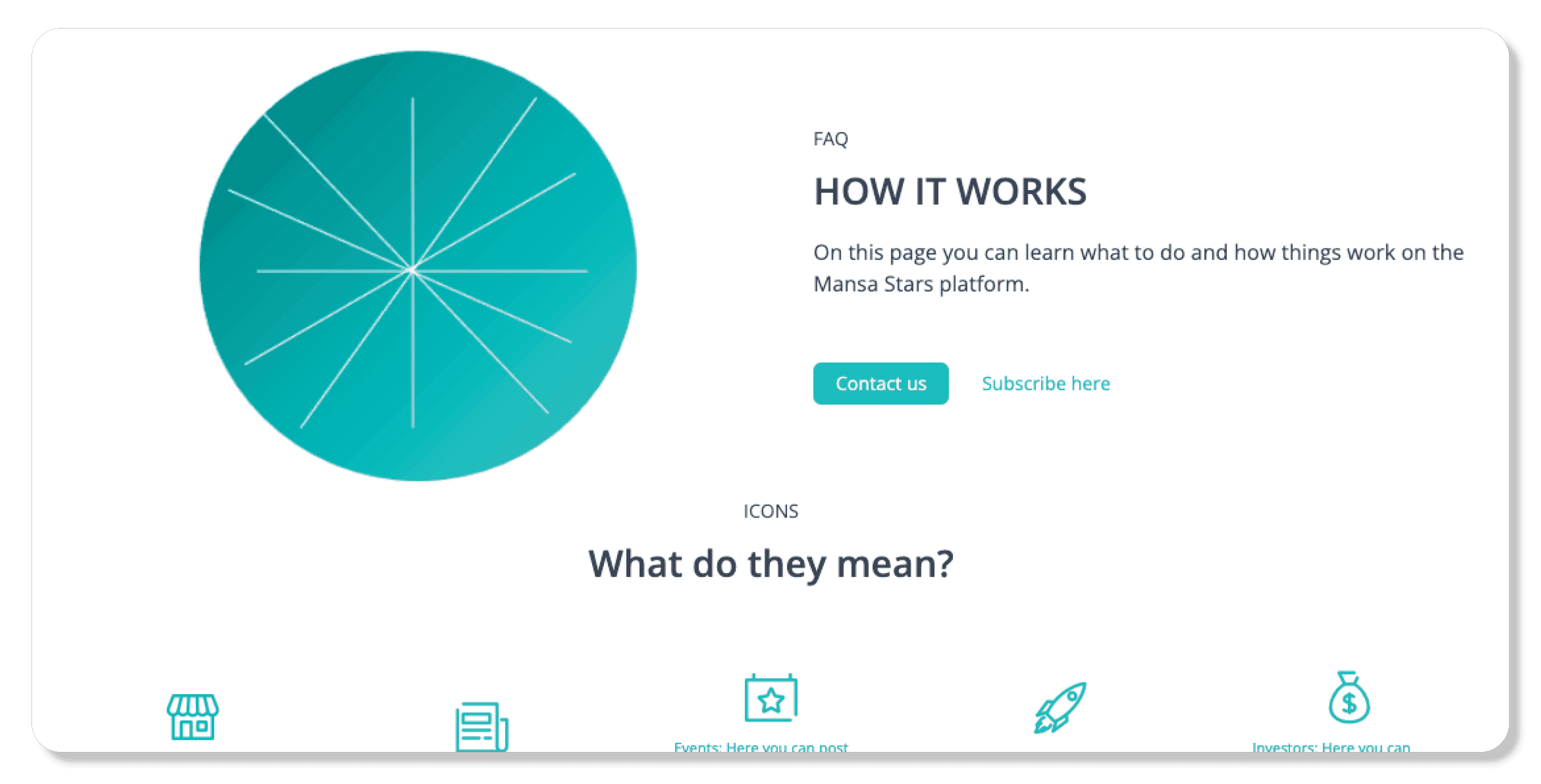
Mansa Stars: Onboarding Clients Through “How It Works” Pages

Article image

As emerging stars rise across Africa’s startup ecosystem, Mansa Stars shines as a platform supporting founders on their scaling journey.

From helping founders craft winning pitch decks to launching across borders, Mansa Stars strives to provide 360-degree digital solutions enabling entrepreneurs to reach their full potential.

To aid user adoption, Mansa Stars used Pages to easily create an engaging “How It Works” page and platform overview directly on their site.

The visually-appealing website covers:

  • Walkthrough of their platform features and icons so new users can navigate with confidence
  • Outlines various membership tiers and associated resources
  • Sections introducing what founders can expect about fundraising and accelerator programs
  • Quick snapshots demonstrating user profiles and interactions

Thanks to Pages' no-code flexibility, Mansa Stars can update guides or create new websites themselves, rather than put extra work on their small team to assist every new sign up.

Procure4Health: Streamlining Event Registration Requests Through Custom Pages

Article image

As a champion for innovation in European healthcare, Procure4Health connects stakeholders across regions to share insights that save lives.

Central to their mission is the Twinning initiative, enabling healthcare procurement groups to be paired for knowledge sharing workshops aimed at adopting impactful solutions.

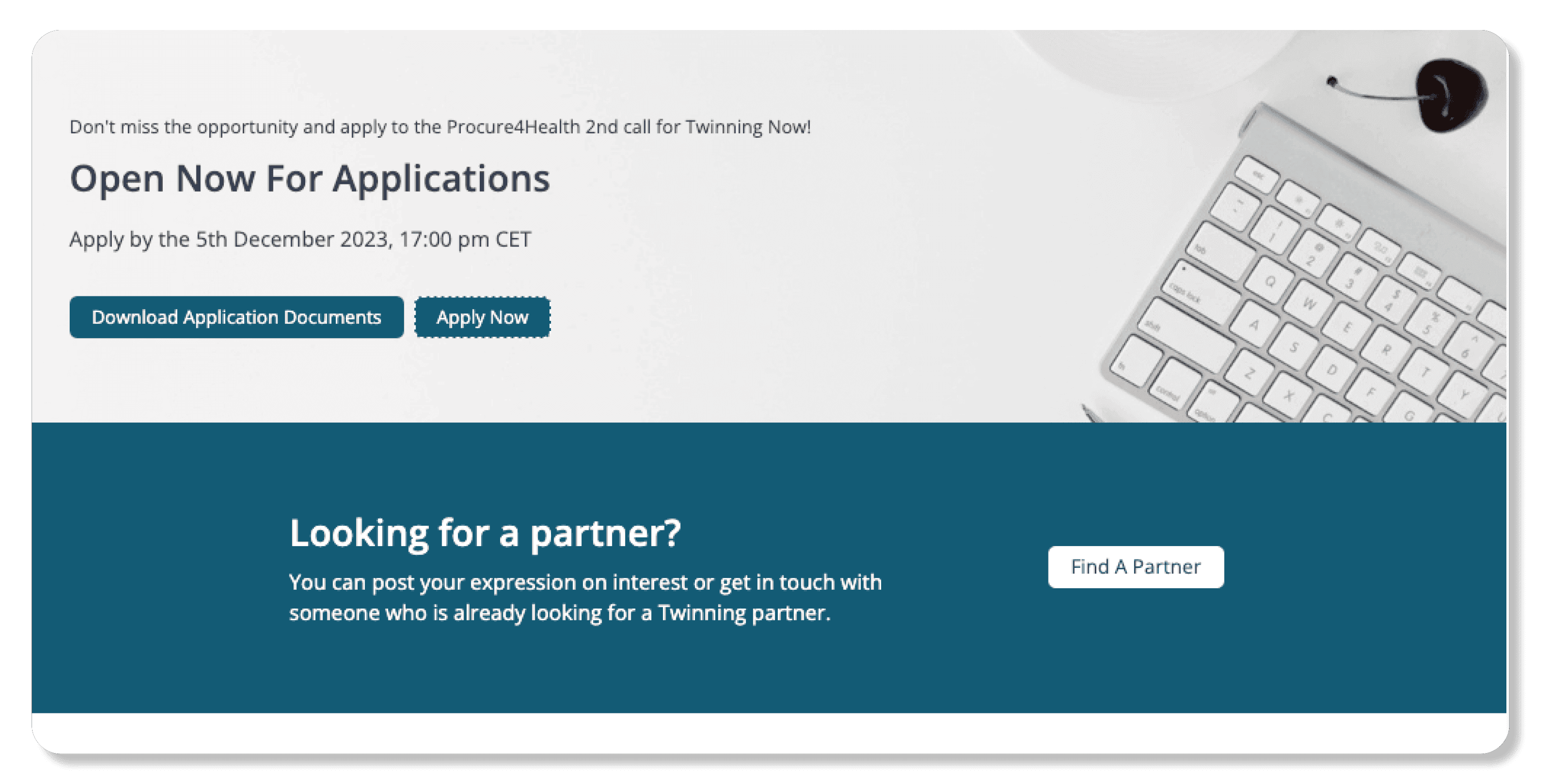
To simplify the event application process, Procure4Health leveraged the power of website creation with Pages as an intuitive way to design an event-registration website themselves without coding skills.

The end result is a responsive page introducing their knowledge sharing program and its goals around technology adoption and capacity building. To make the application process easier, they placed a CTA button linked to an application form created with our integrated Forms module.

This allows interested procurers to seamlessly submit proposals as we handle data collection securely on the back end. Afterward, approved applicants meet to exchange best practices through LoftOS matchmaking, which is now AI-powered (Matching 3.0).

Can ChatGPT or an AI Website Builder Create a Website for You?

Partly. AI chatbots such as ChatGPT can generate HTML and CSS for a simple page from a prompt, and many no-code builders now include AI generators that draft a first version of a site. You still need somewhere to host the page, a way to edit it later, and features such as forms, member logins or event registration. That is where a visual builder helps: an AI draft gets you started, and the drag-and-drop editor lets you keep the site up to date yourself, without code.

So, Can I Just Make a Website for Free?

As you can see from stories above, everyday people are bringing ideas to life on their own sites without coding using no-code website builders like our very own Pages.

Startup accelerators, regional innovation programs, B2B networks and many organizations design fully custom spaces just through dragging, dropping and tweaking templates. No scary lines of code in sight!

And here's the exciting news - you can dip your toes into launching your own online presence entirely free with LoftOS. We want to empower visions of all sizes, so we offer a free plan, LoftOS Free (up to 5 users and 2 admins, unlimited visitors), for testing concepts before upgrading. Compare all plans.

Come for Pages, Stay for More: Choosing the Right No-Code Solution for You

But LoftOS is more than just website creation.

LoftOS is a modular AI platform for B2B communities, networks and ecosystems, so even users without programming experience can set up member portals, databases and workflows. If you need gated content, member portals, or multi-user workflows, see our deep-dive on how to build a web app without coding for what that next step actually looks like.

Ready to hit the ground running? Try our templates, a curated selection of our most popular use-cases. Choose one that best fits your needs and launch any type of web projects you can think of in seconds.

Florian Feuer
Florian FeuerCMO/Co-Founder at Innoloft

Florian Feuer is Co-Founder and CMO of Innoloft, where he leads the marketing and customer success teams. Since launching Innoloft in 2019, he has worked with more than 100 community and platform operators — economic development agencies, tech transfer offices, associations, innovation clusters and corporates — who build their own portals on LoftOS.

Share article

Related posts

Article image Step-by-Step Guide on How to Create a Web Portal That Works in 2026

Best practices

Step-by-Step Guide on How to Create a Web Portal That Works in 2026

Creating a web portal today is no longer a project limited to developers or IT-heavy teams. Organizations of all sizes are under pressure to provide stakeholders with a central hub for resources, collaboration, and communication. The demand is clear: fast, simple, and flexible digital solutions.A platform like LoftOS, for example, lets you design, launch, and manage portals without writing a single line of code. In this guide, you’ll learn what a web portal is, how it works, its key features, and the exact steps you can take to create one efficiently in 2026.By the end, you’ll be equipped with the knowledge to choose the right tools and avoid common pitfalls, while building a portal that delivers a seamless user experience and long-term value.Quick answer: To create a web portal, (1) define who it is for and what they need to do there, (2) choose a build approach: a no-code portal platform, an AI app builder or custom development, (3) plan user roles and permissions, (4) design navigation and search, (5) add core features such as login, dashboards and integrations, (6) test with a pilot group, and (7) launch and keep improving. A typical custom build takes 4 to 7 months; a no-code platform can shorten that considerably because login, roles and hosting already exist.Key TakeawaysBuild a web portal the smart way: pick a no-code platform, define your audience, then structure access with user roles and permissions.Nail usability early. Clear visual hierarchy, intuitive navigation bar, and a fast search box drive adoption.Ship value in weeks, not quarters. Start lean, then scale with reporting and analytics, integrations, and continuous iteration.Reduce risk with staged rollouts, internal testing, and a focus on real client experience.What Is a Web Portal?A web portal is a centralized online platform that brings together information, tools, and services in one accessible place. It acts as a secure entry point for users, providing personalized content, streamlined communication, and features tailored to specific needs such as knowledge sharing, networking, or resource management.How Exactly Does It Work?A web portal works by authenticating users, managing their access rights, and delivering content or tools based on their profiles. Features like a navigation bar, search box, and role-based user authentication ensure each visitor sees relevant information. Admins can organize resources, manage user groups, and monitor activity through reporting and analytics, while end-users benefit from a structured and intuitive user interface.What Is the Difference Between a Website and a Web Portal?A website is built for anonymous visitors: everyone sees the same public pages. A web portal requires a login and shows each user content, data and tools based on their role, for example a member directory, shared documents or a personal dashboard. Many organizations run both: a public website for marketing and a portal behind it for members, customers or partners.Types of Web PortalsWeb portals serve different purposes depending on the audience and goals. Here are the most common types:Employee portals: Centralized access to internal documents, HR tools, and workflows.Customer portals: Secure spaces for clients to manage accounts, track orders, or request support.Client portals: Often used in professional services to share resources, project updates, and billing.Partner portals: Collaboration hubs for suppliers, resellers, or business partners.Knowledge portals: Organized libraries for sharing documents, training, and research.E-learning portals: Online platforms for courses, assessments, and certifications, similar to a learning management system. Take a look at our E-Learning Software template and get started for freeModern platforms like LoftOS are flexible enough to cover these scenarios, allowing organizations to consolidate needs into one digital space.Key Features of a Web PortalTo make a web portal effective, it should include core features that improve efficiency, security, and usability:Dashboard & reporting and analytics: Track performance, activity, and KPIs in one view.Search box & navigation bar: Ensure users can find resources quickly through intuitive menus and filters.Content management system: Create, edit, and organize pages without technical help.User authentication & user roles and permissions: Secure access with role-based controls and, where needed, single sign-on.Personalization & user experience: Adapt content and layout to each user’s needs, with a clear visual hierarchy.Task management tools: Streamline processes like approvals, submissions, or event registrations.Integration options: Support for file uploads, payment gateways, and connections to existing tools.Each of these features contributes to a portal that not only functions well but also scales with organizational needs, helping you grow your community effectively.Step-by-Step Guide to Creating a Web PortalBuilding a web portal is a structured process. Each step matters, from choosing the right technology to refining user access. Below are the first key stages that will help you set a strong foundation.Step #1: Choose Your Development ApproachThe first decision is whether to custom-build or use a no-code platform. Custom-builds are often expensive and time-consuming, while no-code tools are faster, more flexible, and require no IT department. A third option has emerged: AI app builders that generate a portal from a plain-language prompt or a spreadsheet. They are fast for prototypes and simple client portals. Before you commit, check how they handle user roles and permissions, where your data is hosted, and who maintains the generated app once it grows.LoftOS is a versatile solution that can serve as portal software among many other use cases, giving you the option to set up a secure client portal or even broader community features without technical effort. If your organization needs help comparing its options, we recommend our web portal software guide, and afterward you can align your choice with a clear community strategy to ensure long-term success.Step #2: Define Purpose and AudienceBefore designing, clarify the goal of your web portal. Is it meant for employees, customers, or partners? Each audience has unique expectations. For example, a learning management system supports online training, while a client portal provides collaboration and document sharing. Identifying your primary audience early helps you avoid scope creep and ensures features match user needs. If you’re unsure how to align design with audience, a resource like this community website builder article shows how purpose-built portals can support different stakeholders effectively.Step #3: Plan Structure and RolesOnce the purpose is clear, define the portal’s structure. Create logical sections for knowledge, events, or workflows, and set user roles and permissions to control who sees what.LoftOS is strong here: Particularly for organizations planning long-term digital infrastructure or exploring how to build a digital platform, as it lets you organize user groups, tailor access by role, and even monetize memberships with tiered visibility. This flexibility makes your web portal secure, scalable, and sustainable. Step #4: Design the User ExperienceGood design boosts adoption, as explained in this practical community engagement plan.A well-designed web portal keeps users engaged and productive. Focus on creating a clear visual hierarchy, a consistent user interface, and an intuitive navigation bar. These elements make it easy for people to find what they need. A versatile tool like LoftOS supports flexible layouts and ensures the user experience feels smooth across different use cases. Step #5: Add Core Features and ToolsThe right mix of features ensures your portal is useful without being overloaded. Make sure you include essentials such as a search box, reporting and analytics, task management, and a simple content management system. Personalization options and secure user authentication also increase trust and usability.If your portal is meant to connect people, for example members, startups and investors, or event participants, add matchmaking. In LoftOS, AI matchmaking reads two profiles in full, scores how well they fit and shows members a short reason for every suggested match.Step #6: Test and Optimize Before LaunchTesting is critical to delivering a reliable portal. Conduct internal testing to validate performance, check data flows, and review security. Implement single sign-on for smoother access, and verify integrations like payment gateways and File uploads. LoftOS provides flexible integration options that support these needs without extra development. To understand how testing fits within a broader digital build, see how to build a web app.Step #7: Launch and Continuously ImproveLaunching is only the beginning. Provide onboarding and clear customer support or customer service channels, so users adopt the portal confidently while also focusing on building a community around your product. Track engagement through reporting and analytics and improve over time, whether by refining features or modernizing workflows. LoftOS adapts easily, supporting ongoing software modernization without complex IT projects.Cost of Creating a Web PortalA web portal in 2026 typically costs between $5,000 and $150,000+, depending on scope and complexity. Small portals with limited roles and simple features sit at the lower end, while enterprise-grade portals with multiple integrations, advanced security, and large user bases fall into the higher ranges.Estimated Costs by Complexity:Basic portal: $5,000–$15,000 (few roles, simple design, limited features)Medium complexity: $15,000–$50,000 (custom UI, payment or file integrations, moderate traffic)Enterprise level: $50,000–$150,000+ (advanced security, SSO, multiple integrations, high scalability)Factors that affect cost:Features and functionality: advanced tools like reporting and analytics, task management, or SSO add complexity.Design and usability: custom layouts, visual hierarchy, and multi-device support.Team expertise: senior developers or specialized agencies drive costs up.Integrations: adding payment gateways, File uploads, or APIs.Testing and compliance: strong security, internal testing, and privacy requirements.Ongoing maintenance: hosting, updates, and continuous software modernization.Pro Tip: To reduce costs and time-to-launch without cutting quality, start with a much more affordable ready-made platform like LoftOS. You’ll cover core needs (roles, permissions, analytics, integrations) while avoiding expensive custom builds and lengthy timelines.Common Challenges & How to Overcome ThemEven the best web portal projects can face obstacles. The key is to anticipate common issues and have clear strategies to address them. Here are four of the most important challenges, along with practical solutions.Challenge #1: Security & Data PrivacyUsers won’t trust a portal without strong safeguards. In today’s tech ecosystem, implementing robust user authentication, role-based access, and single sign-on is essential to protect data. A secure foundation also aligns with compliance needs across industries. If your users are in the EU, check where the platform hosts your data and sign a data processing agreement (DPA) with your provider to meet the GDPR.Challenge #2: Scalability & PerformanceA portal that slows down or crashes under heavy use is a liability, as it can negatively affect community engagement metrics. Use internal testing and modular design to prepare for growth. Regular updates and ongoing software modernization keep performance stable. Challenge #3: User AdoptionEven feature-rich portals fail if people don’t use them. A seamless user experience, clear visual hierarchy, and simple onboarding can make adoption easier. Member engagement grows when users feel value quickly. Challenge #4: Integration ComplexityDisconnected systems waste time and frustrate users. Plan integrations carefully, focusing on essentials like reporting and analytics, task management, and third-party apps. Test connections before launch to avoid surprises. To see how integrated activities strengthen portals, review this piece on community engagement activities.Time Required to Build a Web PortalA full web portal in 2026 often takes 4 to 7 months from planning to launch, assuming a moderately complex scope. Simpler versions can roll out faster, but more advanced portals—with heavy integrations and security—can push this timeline further. Below are key factors that influence how long your project will take.Factors affecting timeline:Scope & Complexity: Number of features, workflows, custom modules.Design & UX: Custom layouts, responsive design, and user interface work.Integration Needs: External systems, APIs, third-party tools.Testing & QA: Internal testing cycles, performance, security checks.Team Capacity & Experience: How many people, skill levels, availability.Feedback & Iteration: Stakeholder reviews, revisions, delays in approvals.Estimated Time by Complexity:Basic portal: ~ 2 to 4 monthsMedium complexity: ~ 4 to 7 monthsEnterprise / Advanced: ~ 7 to 12+ monthsPro Tip: Use a modular, iterative approach. Launch a core version first, then expand features in phases. A tool built for flexibility, like LoftOS, can cut future cycles. Examples of Web PortalsWeb portals come in many shapes and sizes, tailored to the audiences they serve. Some focus on uniting regional ecosystems, while others act as hubs for research and learning. The following examples illustrate this variety. In these cases below, the organizations happened to build their solutions on LoftOS, so treat them as first-party examples. Across our customer base, more than 80 web portals have been built with LoftOS, with over 100,000 users in total (our own figures as of November 2026, not an industry benchmark).Example #1: Niedersachsen.next (Innomatch)Niedersachsen.next built Innomatch as a regional web portal connecting startups, investors, and other stakeholders. The platform has grown into a full ecosystem, with thousands attending their events. By using LoftOS’ events modules and ticketing system, they segment participants efficiently and track results through reporting and analytics. Read the full Innomatch case study to see how they scaled their community.Example #2: RWTH Aachen University (Collaeb)RWTH Aachen University created Collaeb as a central hub for entrepreneurship. Their web portal unifies mentors, researchers, students, and partners in one space, offering courses, accelerator programs, and networking opportunities. LoftOS enables this single destination to manage content, foster collaboration, and grow participation. Explore the Collaeb case study for details on how the university built a thriving entrepreneurship program.Web Portal FAQWhat is an example of a web portal?Common examples are customer portals for online banking or utility accounts, employee intranets, university student portals and regional ecosystem portals. Niedersachsen.next’s Innomatch, for instance, is a web portal that connects startups, investors and support organizations in Lower Saxony through profiles, events and matchmaking.How do I design a web portal?Start from the tasks users must complete, then build the navigation around them: a dashboard as the homepage, a visible search box, menus that adapt to each user role, and no more than two or three clicks to any core action. Test the layout with a small pilot group before the full launch.Can I create a web portal for free?Yes, within limits. Several no-code platforms offer free tiers for small portals. LoftOS’s Free plan, for example, covers 5 users and 2 admins with unlimited visitors as of November 2026; paid plans start at $29/month for 25 users. Custom development is never free, because you pay for developers and hosting.How long does it take to build a web portal?A custom-built portal typically takes 2 to 4 months for a basic version, 4 to 7 months for medium complexity and 7 to 12 months or more for enterprise projects. With a no-code platform you can launch a first version much faster, because login, roles, hosting and core modules are already built.How much does it cost to build a web portal?A custom web portal typically costs between $5,000 and $150,000 or more, depending on features, integrations, security and team rates. No-code platforms replace most of that upfront development cost with a monthly subscription, which makes them the cheaper route for most member, customer and partner portals.Start Building Your Web Portal Today – No Coding RequiredCreating a web portal no longer needs to be a drawn-out or expensive process. With modern no-code platforms, you can launch faster, test ideas, and expand as your needs grow. LoftOS gives organizations the flexibility to configure portals for communities, education, or corporate use without relying on IT. Learn more on launching faster with LoftOS, explore the pros and cons of build vs. buy software, or get started directly at innoloft.com.

Article image What Is a Digital Platform Strategy? Importance & Implementation Guide

Best practices

What Is a Digital Platform Strategy? Importance & Implementation Guide

Most organizations struggle to scale digital initiatives without a clear plan. A digital platform strategy provides the roadmap. It defines how platforms are built, governed, and scaled to meet real business objectives. Without it, efforts remain fragmented, costly, and disconnected from user needs. In this guide, we cover everything from core definitions to practical steps, benefits, challenges, and proven best practices, giving you a complete framework to act with confidence.Quick answer: A digital platform strategy is the plan for how an organization creates value by connecting groups of users on a shared digital platform, such as buyers and sellers, members and partners, or companies and research institutes, and for how it builds, governs and grows that platform. It defines who the platform serves, which interactions create value for each side, how network effects are triggered, which technology and governance it runs on, and which metrics prove that it works.Key TakeawaysA digital platform strategy ensures digital initiatives align with business goals and measurable outcomes.It connects critical elements, platform technologies, governance, and data, with user engagement to drive adoption.Following a step-by-step approach, organizations can move from defining goals to launching a minimum viable product, deploying governance, and scaling with confidence.Benefits include stronger engagement, economic impact, and sustainable growth across the platform ecosystem and broader platform economy.Challenges such as low adoption or weak measurement can be avoided with clear goals, analytics, and structured engagement activities.What Is a Digital Platform?A digital platform is a structured environment that connects users, data, and services in one place. It improves user experience by enabling interactions, transactions, and knowledge sharing. Examples include e-commerce platforms, enterprise platforms, and community hubs that drive collaboration and value exchange.What Is Digital Platform Strategy?A digital platform strategy is the structured plan that defines how platforms are created, managed, and expanded to support organizational goals. It aligns platform technologies, governance, and processes to deliver a clear value proposition. By doing so, it ensures platforms remain adaptable, scalable, and relevant in fast-moving markets.Two Types of Platform StrategyThe term is used for two related things, and it helps to know which one you are planning:Platform business model (multi-sided platform): The platform itself is the product. It creates value by matching two or more user groups, such as buyers and sellers or app developers and users, and grows through network effects: every new participant makes the platform more valuable for the others. Marketplaces and app stores are the classic examples. Harvard Business Review describes this shift from linear "pipeline" businesses to platforms in Pipelines, Platforms, and the New Rules of Strategy.Ecosystem platform strategy: An organization such as an economic development agency, an innovation cluster, an association or a corporate uses a digital platform to connect its own network of members, partners and stakeholders. The goal is not to sell platform access but to make the network more productive: better matches, faster knowledge sharing and more joint projects.Both follow the same logic. Value comes from the interactions between participants, not from the software alone, and the steps below apply to both.Components of a Digital Platform StrategyA strong strategy combines business direction with technical execution. It provides clarity for leaders, IT teams, and platform adopters, ensuring decisions improve both performance and sustainability. Once the execution side starts, our companion guide on how to build a custom web app shows the no-code stack and rework patterns most teams hit.Key components include:Vision and goals: Define outcomes the platform must achieve, such as growth or efficiency.Governance model: Roles, policies, and accountability frameworks for platform management.Technology infrastructure: Reliable platform ecosystem supported by integrations, APIs, and secure data handling. LoftOS provides adaptable building blocks like custom modules and AI matchmaking.User engagement: Focus on Digital Experience Platform design to create intuitive, accessible journeys.Data and analytics: Measure activity, performance, and impact for continuous improvement.Scalability and adaptability: Ensure the system can support more users, new services, or enterprise platforms without disruption.Step-by-Step Guide to Building a Platform StrategyA digital platform strategy is only useful if it can be put into practice. Here are five steps that show how to move from planning to measurable outcomes. Our companion guide on how to build a digital platform covers the execution side — modules, stack, and the no-code path from MVP to scale.Step 1: Define Objectives and Value PropositionStart by clarifying what the platform should achieve. A clear value proposition sets direction for your team and expectations for platform adopters. Objectives might include stronger community engagement strategies, faster knowledge sharing, or new revenue streams. Without defined goals, every other step risks falling short.Step 2: Map the Platform EcosystemIdentify who will use the platform and how they interact. A strong platform ecosystem connects members, partners, and stakeholders through an intuitive Digital Experience Platform. For example, when outlining user groups, think of admins, contributors, and external partners. LoftOS provides building blocks like member directories and content spaces that simplify this mapping. See how community leaders succeed in building B2B communities.Step 3: Build a Minimum Viable ProductAvoid overengineering at the start. Launch a minimum viable product to test your assumptions with a smaller audience before scaling. In the platform economy, speed matters. LoftOS enables organizations to create prototypes with custom modules quickly, validating engagement before committing large budgets. Learn more from our guide on how to build community frameworks.Step 4: Deploy Technology and GovernanceExecution depends on the right platform technologies and governance model. Define rules for data use, privacy, and accountability. Modern enterprise platforms must balance security with usability. LoftOS simplifies deployment through drag‑and‑drop modules, integrated event tools, and secure data handling. Explore more in our article on managing technology ecosystems.Step 5: Scale and Optimize the StrategyOnce the foundation is stable, focus on growth. This includes expanding user groups, refining features, and aligning with broader organizational transformation goals. Tracking performance is essential to guide platform technology strategy and ensure results. With analytics and engagement features, LoftOS supports scaling digital communities without major IT effort.Benefits of Platform StrategiesA strong digital platform strategy brings measurable value to both organizations and users. Here are the main benefits:Improved User Engagement: A well-designed Digital Experience Platform ensures smoother interactions and long-term loyalty. This is the foundation of community-led growth, where engagement drives adoption.Economic and Operational Impact: By consolidating services into unified enterprise platforms, organizations save costs, reduce inefficiencies, and support digital business transformation without lengthy IT projects.Scalable Growth: With a clear framework, platforms can expand to new markets and audiences, strengthening the platform economy. Using analytics and feedback loops ensures decisions are data-driven and sustainable.Collaboration and Innovation: A healthy platform ecosystem encourages knowledge-sharing and partnerships, fostering innovation. Learn more about the tangible benefits of building online communities that generate long-term value.Together, these benefits make platform strategies a cornerstone of modern organizational growth.Common Challenges & How to Overcome ThemEven the best digital platform strategy will fail without anticipating obstacles. Here are five common challenges and how to address them.Challenge 1: Lack of Clear GoalsMany organizations jump into platforms without defined outcomes, which derail organizational transformation efforts. Without measurable objectives, success is impossible to track. Pro Tip: Always link goals to business outcomes and define key results upfront. This ensures your platform aligns with leadership priorities and avoids wasted resources.Challenge 2: Low User EngagementA platform without active users quickly becomes irrelevant. When platform adopters don’t participate, the Digital Experience Platform loses value. Engagement grows when admins design relevant spaces, useful content, and interactions that reward participation. A proven approach is implementing structured community engagement activities that encourage regular contributions and spark dialogue.Challenge 3: Data Silos and Poor MeasurementLeaders need evidence that platforms work. Without integrated analytics, insights stay locked in silos. Weak reporting undermines the platform technology strategy and leads to uninformed decisions. Pro Tip: Bake in analytics from the start. Tools that track member activity and outcomes make it easier to prove ROI. Explore how community engagement metrics reveal which actions truly drive results.Challenge 4: Resistance to AdoptionEven well-designed platforms face hesitation from staff and stakeholders. Some teams resist change because workflows feel disrupted. This slows growth of the platform ecosystem. Pro Tip: Start small with early adopters and champions who showcase benefits. Visible success stories build trust and encourage broader participation across the organization.Challenge 5: Overcomplex Technology ChoicesMany organizations overbuild, choosing heavy platform technologies or sprawling enterprise platforms that take months to implement. Complexity discourages users and stalls momentum. Pro Tip: Pick adaptable, modular tools that scale with needs rather than overwhelm teams. Lightweight solutions like LoftOS show how platforms can remain simple without sacrificing capability.By recognizing and tackling these issues early, organizations increase the odds of lasting success with their platform strategy.Best Practices for a Successful Digital Platform StrategyWhen readers scroll here, they expect clarity, not theory. These five best practices will give you a proven framework to make your digital platform strategy successful from day one.Practice 1: Define Goals and ObjectivesThis is Step 1 in practice: set measurable outcomes and a clear value proposition before you build, then check every later decision against them. Your goals also guide tool choice; our best no-code app builder guide compares the options.Pro Tip: LoftOS, our own modular AI platform, lets you turn those goals into a first version quickly and adjust it as you learn.Practice 2: Set Key Channels and RolesWithout structure, collaboration gets messy. Decide early which communication channels exist and who manages them. This turns your Digital Experience Platform into an organized space instead of a noisy forum. A good example is creating role-based hubs, similar to what’s explained in our resource on building community websites. LoftOS simplifies this by letting you design member areas with easy to use, flexible tools.Practice 3: Develop a Content StrategyContent keeps platforms alive. Without regular updates, even the strongest platform ecosystem goes silent. Map out an editorial plan that includes resources, events, and conversations that matter to your users. The community engagement plan outlines how consistent publishing sustains loyalty. On LoftOS, admins can automate updates and newsletters, so content strategy becomes manageable instead of overwhelming.Practice 4: Measure and IterateWhat isn’t measured can’t improve. Tracking data isn’t optional. It’s what separates growth from guesswork. A solid platform technology strategy includes KPIs that prove value to leadership and funders. For practical guidance, this community strategy shows you how iteration cycles turn insights into improvements. LoftOS dashboards make it easy to see what’s working and what isn’t, without extra analytics tools.Practice 5: Foster Continuous EngagementLaunching is only half the work. Sustaining momentum means ensuring platform adopters return, interact, and contribute regularly. This is how a thriving platform ecosystem forms. Engagement grows through events, groups, and networking opportunities. LoftOS comes with a wide array of features like AI matchmaking, which scores every suggested match and shows members a short reason why it fits, or speed networking to encourage members to stay active, making engagement a natural habit instead of a forced effort.By applying these practices, you give your platform not just a launchpad, but a long runway for success.Digital Platform Strategy ExamplesPlatform strategies look different depending on who the platform connects. Three common patterns:Marketplaces and App StoresAmazon's marketplace for third-party sellers, Airbnb and Apple's App Store follow the multi-sided model. The operator sets the rules and builds the trust layer (payments, reviews, quality standards) and earns when participants transact. Their hardest strategic problem is the cold start: attracting enough of one side to make the platform worth joining for the other.Regional Innovation EcosystemsPublic innovation and economic development agencies run platforms that connect companies, research institutes and funding programs in their region. Niedersachsen.next operates innomatch niedersachsen to help partners across the state find each other, and it's OWL uses its innovation platform to connect around 200 companies, research institutes, and organizations in its technology network. Here the strategic goal is better matches and more joint projects, not transaction revenue.Member and Association NetworksAssociations and chambers use platforms to make their members more useful to each other. Hessenmetall runs MEINetzwerk HESSENMETALL for its 650 member companies, and the German-Polish Chamber of Industry and Commerce (AHK Poland) brings together over 970 member companies in its supplier forum.The ecosystem and association examples run on LoftOS, our own product, so treat them as first-party evidence rather than an independent survey. By our own count, over 80 web portals have been built with LoftOS, with more than 100,000 users in total (November 2026).FAQ: Digital Platform StrategyWhat is an example of a digital platform?Marketplaces such as Amazon and Airbnb, app stores, and social networks are the best-known digital platforms. Organizations also run their own platforms, for example a regional innovation portal that connects companies with research institutes, or an association network where member companies find partners. What they share: the platform connects at least two groups that interact directly.What is a platform strategy framework?A platform strategy framework is a structured way to plan a platform. It defines the participant groups and the core interaction between them, how value is created and shared, the governance rules, how the first users on each side are attracted, and which metrics show success. The five steps in this guide form such a framework.How do you build a digital platform business model step by step?Start by naming the user groups and the one interaction that creates value between them. Define the value proposition for each side, then solve the cold start, usually by seeding one side first, for example with existing members or partners. Launch a minimum viable product, set governance and incentives, and scale once interactions grow.Why are digital platforms so powerful?Because of network effects: each new participant makes the platform more valuable for everyone else, while the cost of adding one more user stays low. Every interaction also generates data that improves matching and recommendations. The flip side is that platforms need critical mass; below it, users see too little value to stay.Simplify Your Platform Strategy with LoftOSRunning a digital platform strategy doesn’t need to be complex or time-consuming. With LoftOS, you get everything in one place: event management, member directories, databases, landing pages, chat, matchmaking, and networking tools.It’s flexible, customizable, and built for organizations that want results without technical barriers. Discover the full LoftOS product overview, or explore how LoftOS makes strategy execution simple. The tools are ready, you just need to take the next step.

Article image Top 8 Matchmaking Tools & Software in 2026

Best practices

Top 8 Matchmaking Tools & Software in 2026

Finding the right connections at events or within professional communities has never been harder. Manual outreach, endless spreadsheets, and one-size-fits-all networking rarely deliver results. The answer is matchmaking software — tools built to automate introductions and help people connect based on shared goals, interests, or business needs. In this article, we’ll break down the top 8 matchmaking software in 2026, compare their features and pricing, and show you how to choose the right platform for your organization. This guide covers B2B and event matchmaking: software that connects attendees, members, startups, investors and partners. If you run a dating or matchmaking agency, the FAQ at the end explains how that category differs. Disclosure: LoftOS is our own product. The other seven tools are described from their public websites, and published prices were checked on the vendors’ own sites in November 2026.Key TakeawaysInnoloft’s LoftOS: For organizations that need customizable matchmaking, event management, and community features in one platform, including AI-based match scoring, with a free plan to start.b2match: Best for organizers who want AI-powered meeting recommendations and structured B2B matchmaking formats for trade fairs, expos, and hybrid events.Grip: Ideal for large-scale conferences needing advanced AI algorithms, automated scheduling, and real-time analytics to measure participant engagement and ROI.Brella: A strong choice for startup ecosystems and investor-focused events, offering AI matchmaking and sponsor engagement features tailored to accelerators and innovation hubs.SmartMatchApp: Affordable option for associations and membership organizations that need CRM-style matchmaking tools beyond events, with transparent published pricing.Krowden: For conferences and association events that want topic-based matchmaking, roundtable seating and automatically generated 1:1 meeting schedules, with attendee credits that can be used across events for 12 months.Swapcard: For trade shows and conferences that need AI networking suggestions inside a full event platform with exhibitor and lead-capture tools.Converve: For B2B events and hosted-buyer programs where organizers want to control who meets whom, with published per-event prices.The table below compares the eight tools at a glance.SoftwareMatchmaking focusStarting priceBest forFree planInnoloft’s LoftOSConfigurable matchmaking (attribute rules or AI scoring) for events, communities and programs$29/month (25 users)Associations, clusters, economic development agencies and universities running ongoing matchmakingYes (5 users, 2 admins)b2matchB2B meeting matchmaking for single and multiple events€699/year (single event, up to 100 participants)International trade fairs, brokerage events and hybrid conferencesNot publishedGripAI meeting recommendations and automated schedulingPricing on requestLarge trade shows and conferencesNot publishedBrellaAI matchmaking and meeting booking for eventsPricing on requestStartup, investor and innovation eventsNot publishedSmartMatchAppMatchmaking CRM for ongoing introductions€486/year (Essential, up to 2,500 clients)Matchmaking agencies, networking communities and membership groupsNot publishedKrowdenTopic-based matchmaking, roundtable seating and algorithmic 1:1 meeting schedules€2,000/year (Basic, 150 attendee credits)Conferences, trade shows and association eventsNo (free demo event)SwapcardAI networking suggestions and meeting booking inside a full event platformPricing on requestTrade shows and conferences with exhibitorsFree trial (Starter)ConverveRule-based matchmaking with pre-scheduled 1:1 meetings$3,980 per event (Match, up to 100 attendees)B2B events and hosted-buyer programsNot publishedPrices as published on each vendor’s site in November 2026. The metered units differ (users, participants per event, attendee credits, client records), so the starting prices are not directly comparable.1. Innoloft’s LoftOS – Best for Customizable, Ongoing MatchmakingLoftOS is built for organizations that need matchmaking at the core of their events and programs. It combines precision matching with event management and engagement tools, making it suitable for both large conferences and smaller community-driven programs.Key FeaturesCustomizable Matchmaking: Define what makes a perfect match for your event. Use participant profiles, goals, and location data to set matching rules. Weight importance levels, enable automatic recalculations, and cross-sync with other databases for accurate and up-to-date pairings.AI Matchmaking (Matching 3.0): Since the October 2026 release, a guided setup wizard lets admins pick the two modules to match and choose how matches are calculated: attribute pairs, written scoring instructions, or AI scoring. With AI scoring, the AI reads both entries in full, follows your instructions and returns a score with a short reason that members see on the match, so no attribute mapping is needed. AI generation can also propose a concrete joint project for each match, including each side’s role and why it fits. Matches can be released in small batches, all at once or as a swipe deck; two sides are introduced only when both accept, and members rate suggestions from 1 to 5 stars.Speed Dating & Meeting Scheduling: Move beyond passive networking. LoftOS offers structured speed-dating formats and built-in meeting scheduling, ensuring participants meet the right people at the right time. Attendees can register flexibly and organizers can track all sessions in one place.Event Module with Analytics: Host virtual, hybrid, or in-person events with full agenda customization, video integration, and live chats. Event analytics provide insight into engagement levels, popular sessions, and matchmaking outcomes, giving organizers measurable results.In practice: Business Metropole Ruhr, Matchmaker.Ruhr uses LoftOS to match companies with business partners in the Ruhr region, and Niedersachsen.next, innomatch niedersachsen runs Lower Saxony’s innovation community on it. Both platforms run on LoftOS, so treat them as first-party examples rather than independent reviews.PricingLoftOS offers flexible plans for different team sizes and needs:LoftOS Free – For testing and learning about LoftOS. Includes 5 users, 2 admins, and unlimited visitors.LoftOS Starter ($29 per month) – For small user numbers and low support needs. Includes 25 users, 2 admins, and ticket & email support.LoftOS Team ($349 per month) – Base features for moderate user numbers. Includes 250 users, 3 admins, onboarding by a customer success manager, and a customizable domain.LoftOS Professional ($849 per month) – Advanced features for larger user numbers. Includes 1,000 users, 10 admins, 2 languages, analytics, and a commerce package.LoftOS Enterprise (pricing on request) – Expanded customer success and high user numbers. Includes custom users, unlimited admins, all features, and full white label.See the full plan breakdown on our pricing page.Where Innoloft ShinesAll-in-one platform: Combines matchmaking, events, and community features in one place.Ease of use: Admins can configure matchmaking rules and event workflows without IT support.Trusted support: Dedicated customer success managers help tailor the matchmaking process to fit your event format.Where Innoloft Falls ShortBecause LoftOS is highly flexible and adaptable to many use cases, there can be a learning curve during setup. Most organizations benefit from initial guidance, after which the system runs smoothly. The breadth of customization is a strength, but it’s best leveraged with support from our customer success team to make the most of the platform.Customer Reviews“The flexibility and adaptability of the platform. The quick response rate of our CSM [sensitive content hidden]. The fact that we can build our own modules and programmes and now even our own category trees. ” - Capterra Review“I love the possibility of easy customization and openness of features to adapt to your dedicated use case. The company cares about its customers and listen to their new ideas or requirements to implement in the future. If there is any bug, the team is fast to repair it. ” - Capterra ReviewWho Innoloft is Best ForInnovation and trade organizations: Associations, clusters, and economic development agencies that need to connect companies, startups, research partners, and investors efficiently.Universities and research institutions: Teams managing tech transfer, spin-offs, or entrepreneurship programs that require structured networking and reporting.Event organizers: Running conferences, trade fairs, or hybrid events where matchmaking and participant engagement are central to success.2. b2match – Best for Global Industry Eventsb2match is a comprehensive B2B event matchmaking platform designed to create meaningful connections across in-person, hybrid, and virtual formats. With over a decade of experience and thousands of events hosted, it provides organizers with robust tools for networking, scheduling, and participant engagement. Its strength lies in combining automated AI-powered recommendations with flexible event workflows, making it a reliable choice for international conferences and industry trade shows.Key FeaturesAI-Powered Matchmaking: Uses machine learning to recommend relevant participant profiles in real time, helping attendees find the most valuable connections.Segmentation & Booking Rules: Allows organizers to segment attendees by type (investor, startup, buyer, seller) and set rules for who can connect, ensuring quality meetings.Integrated Meeting Tools: Supports one-to-one, one-to-many, and group meetings with agenda management, scheduling, and availability tracking.Performance Analytics: Provides insights into meeting requests, accepted matches, and cancellations so organizers can measure engagement and refine event workflows.Pricing For Single EventsStarter (Starting from €699): Perfect for small gatherings, workshops, or focused B2B meetings. Includes up to 100 participants, 1 consultation hour, and 24/7 self-service support.Basic (Pricing on request): Designed for conferences, seminars, and training sessions. Includes 100 participants, 2 consultation hours, and a customizable event website.Professional (Pricing on request): Built for multinational conferences and multi-track expos. Includes 100 participants, 4 consultation hours, and advanced matchmaking features.Professional plus (Pricing on request): Ideal for international conferences and multi-day summits. Includes 100 participants, 6 consultation hours, and lead retrieval.For full details, visit b2match’s official pricing page (checked in November 2026).They also offer plans for multiple events, but the prices are not disclosed publicly.Where b2match ShinesGlobal events: Designed for international industry events with diverse participants.Flexibility: Supports in-person, virtual, and hybrid networking with equal strength.Structured meetings: AI recommender and booking rules keep connections relevant and efficient.Where b2match Falls ShortComplex setup: Advanced customization may require extra time for configuration.Pricing tiers: Costs rise quickly for larger events or advanced features.Learning curve: Organizers may need onboarding to leverage the full suite of tools.Customer Reviews"The AI-powered matchmaking feature was especially valuable. It helped participants quickly identify relevant contacts based on shared interests. The platform's structured meeting slots and easy scheduling system also made it simple to organize efficient and meaningful B2B meetings." — Capterra Review“ Ease of using the platform, options it contains, how customizable it is, handles the event workflow” — Capterra ReviewWho b2match is Best ForEvent organizers: Running global conferences, trade fairs, or large hybrid events where structured matchmaking and international reach are critical.3. Grip – Best AI-Driven MatchmakingGrip is an AI-powered event platform built to drive revenue growth and improve networking outcomes. Unlike standard matchmaking tools, Grip combines machine learning with billions of data points across its ecosystem, delivering precise meeting recommendations for participants. Its flexible system allows organizers to use it as a full event management suite or integrate it with their existing tech stack. Trusted by organizers like Ascential, Clarion, and Hyve, Grip is known for its scale, reliability, and focus on measurable results.Key FeaturesAI-Powered Recommendations: Grip leverages 16+ algorithms and billions of interactions to suggest the most relevant meetings for participants, adapting as behaviors change.Mobile Event App: The award-winning app provides real-time updates, session recommendations, and calendar sync, helping participants manage their schedules with ease.Automated Scheduling (MustMeet): Pre-scheduled meetings are filled automatically, reducing organizer workload by up to 95% while ensuring participants make the most of their time.Analytics & Insights: Provides detailed reporting on meetings, engagement, and participant journeys, enabling organizers to measure success and identify growth opportunities.PricingGrip does not publish fixed pricing. The platform uses a subscription-based model with personalized quotes tailored to event size, features required, and integration needs. Organizers are invited to contact Grip directly for a customized proposal.Where Grip ShinesData-driven precision: Matches improve continuously as the AI learns from participant behavior.Scalability: Trusted for large global trade shows and conferences with thousands of attendees.Flexibility: Can operate as a standalone event platform or integrate with existing systems.Where Grip Falls ShortOpaque pricing: Lack of public pricing details may slow decision-making for budget-conscious organizers.Learning curve: Full feature set requires training for organizers to maximize potential.Resource heavy: Works best for larger organizations with dedicated event teams.Customer Reviews"'It matches a lot of what we want to do and enables networking at scale. It's very adjustable, which we realizedis a need for us. A lot of smart features and you get a good overview things. Everything works! We're one of the first customers for the registration that they now offer and are very excited about how that is going to shape up. Knowing the direction, it'll be really great. And we appreciate having more of the customer journey in one place"  — Capterra Review"The functionality is simple, user-friendly alongside being reliable, which are the key 3 things that I look for in an app for our events." — Capterra ReviewWho Grip is Best ForTrade show and conference organizers: Running large-scale international events that require AI-driven matchmaking and measurable participant engagement.4. Brella – Best for Startup EcosystemsBrella is an event management platform and one of the leading innovation management tools, with strong matchmaking and networking capabilities, widely used in innovation and startup ecosystems. Its AI-driven approach connects attendees with the most relevant people, whether for investor-startup meetings, mentorship sessions, or business speed dating. The system also supports virtual and hybrid events, offering multiple live streams, calendar management views, and sponsor engagement tools.Key FeaturesAI-Powered Matchmaking: Matches attendees by analyzing objectives, profiles, and interests, ensuring that participants meet the most relevant people.Flexible Meeting Formats: Supports one-to-one, one-to-many, and sponsor-driven meetings, as well as mentor-mentee sessions and business speed dating.Customizable Interface: Delivers a user-centric, branded experience aligned with the organizer’s identity to increase engagement and sponsor value.Mobile App: Provides real-time updates, personalized schedules, and easy meeting booking directly from the app.PricingBrella does not publish standard pricing plans. Costs are determined during consultation and depend on attendee numbers, event format, and required features. Organizers need to request a custom quote tailored to their specific needs.Where Brella ShinesStartup focus: Popular in accelerator programs, innovation summits, and investor-focused gatherings.AI networking: Proven to increase meeting acceptance rates and lead generation.Sponsor engagement: Strong tools for connecting sponsors with attendees in measurable ways.Where Brella Falls ShortOpaque pricing: Lack of upfront cost information makes budgeting harder for smaller organizations.Complex feature set: Some organizers may need training to use advanced matchmaking and event management tools.Best suited for larger events: May not be cost-effective for small gatherings.Customer Reviews"I had never used something similar and I found it very interesting how attendees can network via this platform, as well as we can make the whole organization of the event." — Capterra Review"I had a great experience using Brella , I must say that they are the best in people matchamking at Events. Brella Mobile app is amazing and hot engaging for all the people at events" — Capterra ReviewWho Brella is Best ForStartup and innovation event organizers: Running accelerators, investor summits, or mentor-mentee programs where targeted networking is essential.5. SmartMatchApp – Best for Membership OrganizationsSmartMatchApp positions itself as a matchmaking CRM that blends professional networking and client management in a single platform. It is designed for organizations that want to automate introductions, schedule meetings, and manage workflows, all powered by AI. Unlike many competitors that focus only on event-specific use cases, SmartMatchApp also supports long-term relationship management across industries such as associations, chambers of commerce, and the dating sector.Key FeaturesCustomizable Matchmaking: Create personalized introductions with photos, videos, and profile data. AI suggestions simplify matching across various industries.Industry Versatility: Supports use cases beyond events, including mentoring, peer support, membership groups, and business networking.CRM Functionality: Combines matchmaking with CRM tools like task management, reporting, and member portals to streamline operations.Integrations: Connects with 2,000+ apps via Zapier or API for seamless data sharing and process automation.PricingEssential (€486/year): Perfect for solo matchmakers or small teams. Includes smart matchmaking suggestions, custom advanced search, task management tools, and a database of up to 2,500 clients.Advanced (€962/year): Ideal for growing teams. Includes custom branding, multi-page forms, location proximity matching, a dedicated customer success manager, and a database of up to 10,000 clients.Ultimate (€1,458/year): Built for large matchmaking networks. Includes profile relationship structures, AI enablement, custom conditional matching, and a database of up to 20,000 clients.Month-to-month billing is €45, €89 and €135 per month. SmartMatchApp showed these prices in euros when we checked its pricing page in November 2026; prices in other currencies may differ.Where SmartMatchApp ShinesCRM-first approach: Goes beyond events by offering client management and reporting tools.Broad use cases: Serves industries ranging from dating services to nonprofit associations.Affordable entry point: Transparent published pricing with no setup fees, and you can cancel anytime.Where SmartMatchApp Falls ShortEvent limitations: Not as specialized for large-scale conferences or trade shows compared to other tools.Less focus on analytics: Reporting is available but less advanced than enterprise-level platforms.Mixed user experience: Some users find the interface less polished compared to newer event apps.Customer Reviews"I love this product because its a CRM with additional capabilities to easily allow for matching users, and not solely limited to the dating industry. " — Capterra Review"The pros of this app was it was very helpful to me in daily life whenever I needed to look at something and this was there for me" — Capterra ReviewWho SmartMatchApp is Best ForMembership organizations and associations: Groups that need an affordable, flexible tool for ongoing matchmaking and relationship management.6. Krowden – Best for Topic-Based Networking SessionsKrowden is an event matchmaking tool built around topics rather than profiles alone: attendees see which tables, sessions and people match their interests and book their seats or meetings in advance. It covers roundtables, 1:1 meetings and session booking for conferences, trade shows and association events, plus a community platform for networking between events. Organizers can set up a free demo event before committing.Key FeaturesRoundtable Seating: Attendees see an overview of tables and who is attending, so they can book their seats strategically.1:1 Meetings: Shows attendees their best matches and generates a meeting schedule with Krowden’s algorithm.Session Booking: Attendees fill their personal schedule with sessions before the event and see who else is attending.Community Platform: Members get a magic link to join multiple events with one click and stay connected between events.PricingKrowden sells yearly attendee credits that are valid for 12 months and can be used across an unlimited number of events. Prices for 150 credits:Basic (€2,000 per year): Core matchmaking and event networking features for 150 attendee credits.Premium (€2,350 per year): Adds custom attendee profile fields, 1:1 meetings and an SMS module.Professional (€2,650 per year): Adds live show/no-show tracking, a white-label system and a dedicated customer success manager with setup support.Larger credit packages (300 to 1,500 credits) lower the price per attendee, and community plans are priced separately. Krowden showed these prices in euros when we checked its pricing page in November 2026.Where Krowden ShinesTopic-based matching: Lets attendees choose conversations by subject, which suits roundtables and workshops.Flexible credits: One credit pool covers several events within a year.Low entry price: Published prices start at €2,000 per year.Where Krowden Falls Short1:1 meetings not in Basic: Scheduled one-to-one meetings start with the Premium plan.Credits expire: Unused attendee credits lapse after 12 months.Few public reviews: Krowden had no reviews on G2 or Capterra when we checked in November 2026.Customer ReviewsKrowden had no user reviews on G2 or Capterra when we checked in November 2026. The vendor publishes customer case studies on its own website.Who Krowden is Best ForConference and association organizers: Running roundtables, workshops and 1:1 meeting sessions who want attendees to choose conversations by topic.7. Swapcard – Best for Trade Shows With ExhibitorsSwapcard is an event management platform for trade shows, associations and conference organizers that combines registration, an event app, exhibitor tools and AI networking. Its matchmaking suggests people to meet based on enriched profiles, shared interests and in-app activity, and lets attendees book meetings from profiles or exhibitor booths. Swapcard says more than 4,000 trade shows and conferences use the platform.Key FeaturesAI Networking Suggestions: Recommends relevant attendees based on profile data, interests and activity, with an AI-curated attendee list that filters by role, interest, location and company size.Matching Controls: Organizers set matching criteria and visibility rules before the AI makes suggestions.One-Click Meeting Booking: Attendees book meetings from profiles or exhibitor booths, with pre-written connection messages and limits on excessive requests.Exhibitor and Lead Tools: Lead capture, lead qualification, interactive floor plans and hosted-buyer meetings are available as add-ons.PricingSwapcard does not publish prices. Its packages combine a licensing fee with per-user rates for attendees and exhibitors:Starter (pricing on request): Up to 1,000 attendees per year, with a free trial.Professional (pricing on request): Up to 10,000 attendees per year.Enterprise (pricing on request): Unlimited attendees.Additional attendees, branded or white-label apps and hosted-buyer meetings cost extra. Plan details as listed on Swapcard’s pricing page in November 2026.Where Swapcard ShinesExhibitor focus: Matchmaking connects attendees with exhibitors and feeds lead capture.Scale: Plans range up to unlimited attendees per year.Security documentation: Swapcard lists SOC 2 Type 2, ISO 27001 certification and GDPR compliance.Where Swapcard Falls ShortNo public prices: Every plan requires a quote, which makes early budgeting harder.Add-on costs: Several exhibitor and app features are priced separately.Event-centric: Built around events rather than year-round programs or member communities.Customer ReviewsSwapcard is rated 4.6 out of 5 from 229 reviews on G2 (November 2026).Who Swapcard is Best ForTrade show and conference organizers: Running events with many exhibitors where networking should also generate qualified leads.8. Converve – Best for Hosted-Buyer ProgramsConverve is a B2B event matchmaking platform from Germany that has been in the market since 2000. It combines matchmaking, the event program, registration, an event website and app, and analytics. Its approach is rule-based: organizers decide who may meet whom, and the system builds pre-scheduled one-to-one meeting agendas, which suits hosted-buyer programs and structured B2B meeting formats.Key FeaturesIntelligent Matchmaking: Match categories and rules control which attendee groups see and request each other.Meeting Requests and Calendar: Attendees request meetings and manage them in a personal calendar; the higher plans add speed networking.“One Click+” Agenda: In the Pro plan, AI builds meeting agendas according to the organizer’s own rules.Video Meetings: 1:1 video meetings and a video speed-networking carousel run in the browser (Pro plan).PricingConverve publishes net prices per event, tiered by attendee numbers. For 1 to 100 attendees:Match ($3,980 per event): Matchmaking with up to 3 match categories, messaging between attendees, a success manager and 1 admin seat.Match & Meet ($5,790 per event): Unlimited match categories, meeting requests and speed networking.Match & Meet Pro ($9,240 per event): Custom matchmaking logic, the AI agenda, 1:1 video meetings and unlimited admin seats.Converve also shows these prices in euros (from €3,400 per event). Prices as listed on Converve’s pricing page in November 2026.Where Converve ShinesControl over meetings: Organizers define who meets whom instead of relying on suggestions alone.Transparent pricing: Per-event prices are published for every attendee band.Security documentation: Converve lists GDPR compliance and ISO 27001.Where Converve Falls ShortPer-event cost: Pricing is per event, so organizations running many events pay each time.Entry plan limits: The Match plan includes up to 3 match categories and 1 admin seat.Event-centric: Built for events rather than year-round communities.Customer ReviewsConverve is rated 4.7 out of 5 from 44 reviews on Capterra, with 95% of reviews rated positive (November 2026).Who Converve is Best ForB2B event and hosted-buyer organizers: Running trade fairs, tourism or partnering events where pre-scheduled one-to-one meetings are the core of the program.How to Choose a Matchmaking SoftwareSelecting the right matchmaking software depends on your event goals and the type of connections you want to create. Consider these three aspects:1. Matching AccuracyA reliable matchmaking tool should deliver precise and relevant matches. Look for AI-powered matchmaking software like LoftOS, that considers participant interests, profiles, and objectives, ensuring every connection adds measurable value to your event.2. Analytics and ReportingThe best matchmaking software provides detailed analytics on meeting requests, matches made, and participant engagement. This visibility helps you evaluate success, demonstrate ROI to stakeholders, and refine future events for better outcomes.3. Scalability and FlexibilityMatchmaking tools must adapt to different formats, whether small workshops or large international trade fairs. Choose a platform that supports hybrid, in-person, and virtual matchmaking events, while offering customizable features to scale with your growing community or organization.This is not an exhaustive list. Other important factors include integrations, customer support, onboarding, and the learning curve when setting up your matchmaking platform.Frequently Asked QuestionsWhat is matchmaking software?Matchmaking software automatically suggests connections between people or organizations based on profile data, stated goals and interests. In B2B settings, it powers one-to-one meetings at trade fairs and conferences, partner searches in business networks, and introductions between startups, corporates and investors, usually combined with meeting scheduling and analytics.What software do matchmakers use?Professional matchmakers and dating agencies typically use a matchmaking CRM such as SmartMatchApp, which manages client profiles, introductions and follow-ups. Event organizers and business networks use B2B tools such as b2match, Grip, Brella, Swapcard, Converve, Krowden or LoftOS, which add meeting scheduling, event agendas and engagement analytics.What is the best event matchmaking app?There is no single best app; it depends on the event. b2match suits international brokerage events and trade fairs, Grip and Swapcard large trade shows with exhibitors, Brella startup and investor events, Converve hosted-buyer programs with pre-scheduled meetings, and Krowden roundtables and topic-based networking. LoftOS fits organizations that run matchmaking continuously across events, communities and programs rather than for a single event.How much does matchmaking software cost?Published prices in November 2026: LoftOS has a free plan and paid plans of $29, $349 and $849 per month for 25, 250 and 1,000 users. b2match starts at €699 per year for a single event with up to 100 participants. SmartMatchApp starts at €486 per year, Krowden at €2,000 per year for 150 attendee credits, and Converve at $3,980 per event for up to 100 attendees. Grip, Brella and Swapcard quote on request.Is there free matchmaking software?Yes. LoftOS has a free plan for up to 5 users and 2 admins with unlimited visitors, which is enough to test matchmaking rules before a launch. Most event-focused tools in this comparison do not publish a free plan and quote per event.How does AI matchmaking work?AI matchmaking compares participant profiles, goals and interests, and in some tools also behavior such as profile views or accepted meetings, to rank the most relevant contacts for each person. Organizers usually combine these recommendations with rules, for example which participant types may book meetings with each other. In LoftOS, AI scoring reads both entries in full and shows members a score with a short reason on each match, without any attribute mapping.Streamline Matchmaking With InnoloftThe right matchmaking software depends on your goals, event type, and long-term vision. Platforms like b2match, Grip, Brella, Swapcard and Converve suit organizers running large trade shows or accelerator-style programs with rigid formats.But if you are an association, B2B network, event organizer, or university research center looking for full control over how matchmaking is set up and the ability to build a community around it, LoftOS is designed for that job: it combines matchmaking, event management, and community features in a single platform. Instead of stitching together multiple tools, you can manage registration, scheduling, and networking all in one place with dedicated support.With customizable matchmaking, integrated events, and community tools, it gives you the freedom to design engagement on your terms.Ready to raise the quality of your events while saving time on administration?  Discover LoftOS or, if you’re still exploring, continue learning with our guide on Effective community engagement strategies.